.svg)

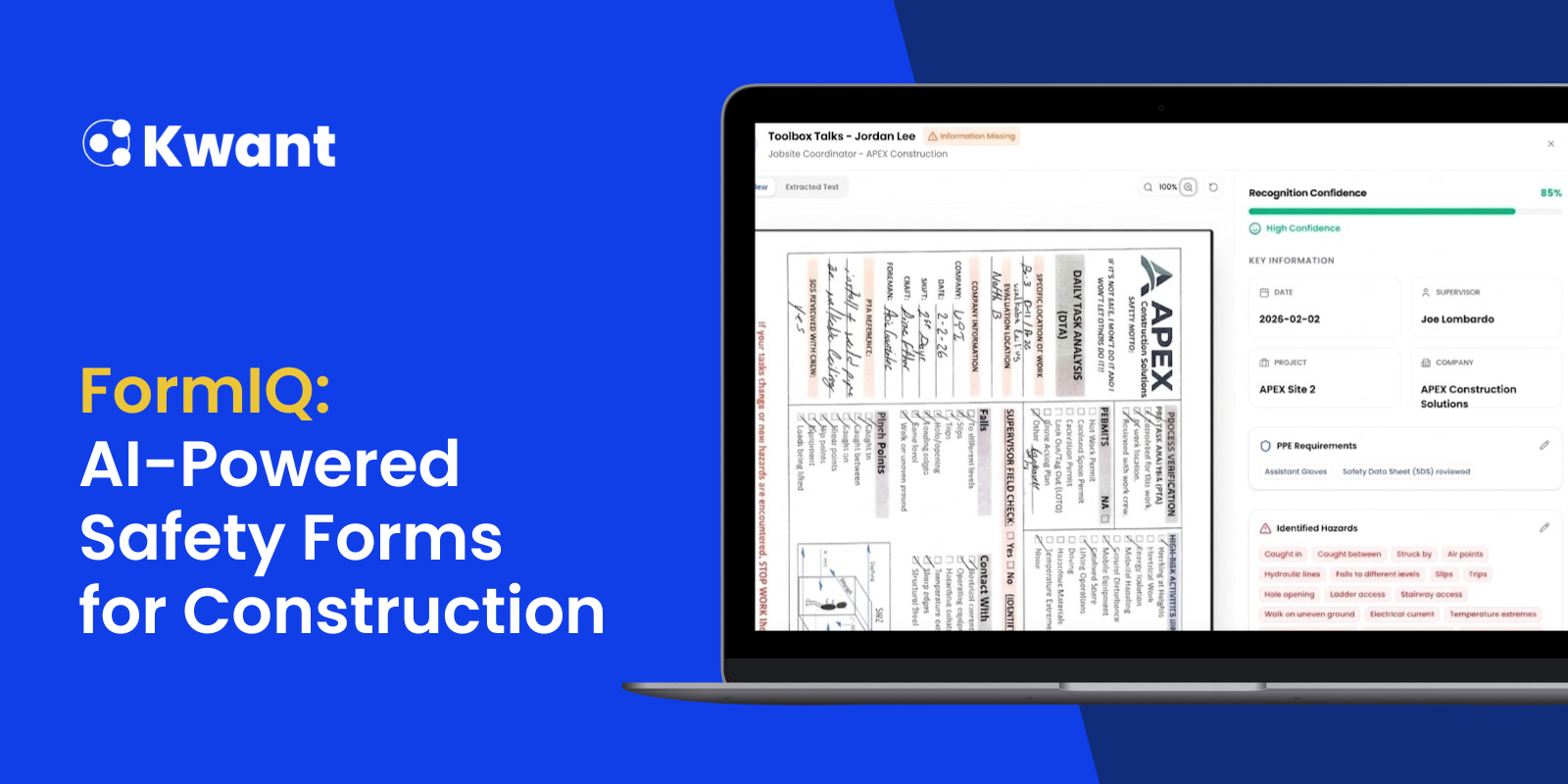


Construction safety teams rely on forms every day. Job Hazard Analyses (JHAs), Pre-Task Plans (PTPs/PTAs), Daily Task Analyses (DTAs), work permits, toolbox talks, and other safety documents help crews identify hazards and establish the controls needed before work begins.
But collecting and reviewing those forms can be a major administrative burden.
On large construction sites, hundreds of forms may be completed every day. Some are digital. Others are PDFs. Many are still handwritten, and for good reason. Handwritten forms can encourage workers to slow down, review the task, identify applicable hazards, and physically sign off with their teams.
The challenge is what happens after the form is completed.
Safety teams still need to collect, scan, review, verify, organize, and track those documents. By the time a missing signature, incomplete field, or missing control measure is discovered, the crew may already be working.
FormIQ is designed to change that.
Kwant’s new AI-powered safety forms module can ingest handwritten, printed, and digital forms, extract the information, and validate submissions against predefined safety requirements.
FormIQ is currently in beta with select Kwant customers, who are helping shape the product through ongoing feedback and real-world testing.
Why FormIQ?
Construction teams shouldn't have to completely change their field workflows to digitize safety documentation.
Many workers and safety teams still prefer familiar paper forms. Handwritten forms can create more engagement with the safety process because workers physically complete each section rather than quickly copying information from one digital form to another.
FormIQ is built around that reality.
Instead of requiring crews to replace their existing forms, FormIQ allows teams to submit the forms they already use and uses AI to turn them into structured, searchable records.
That means safety teams can move toward automated compliance workflows without forcing workers to adopt another app or completely change how they complete their forms.
The result is a bridge between traditional field workflows and modern AI-powered safety management.
How FormIQ Works
FormIQ brings the safety form workflow into four steps:
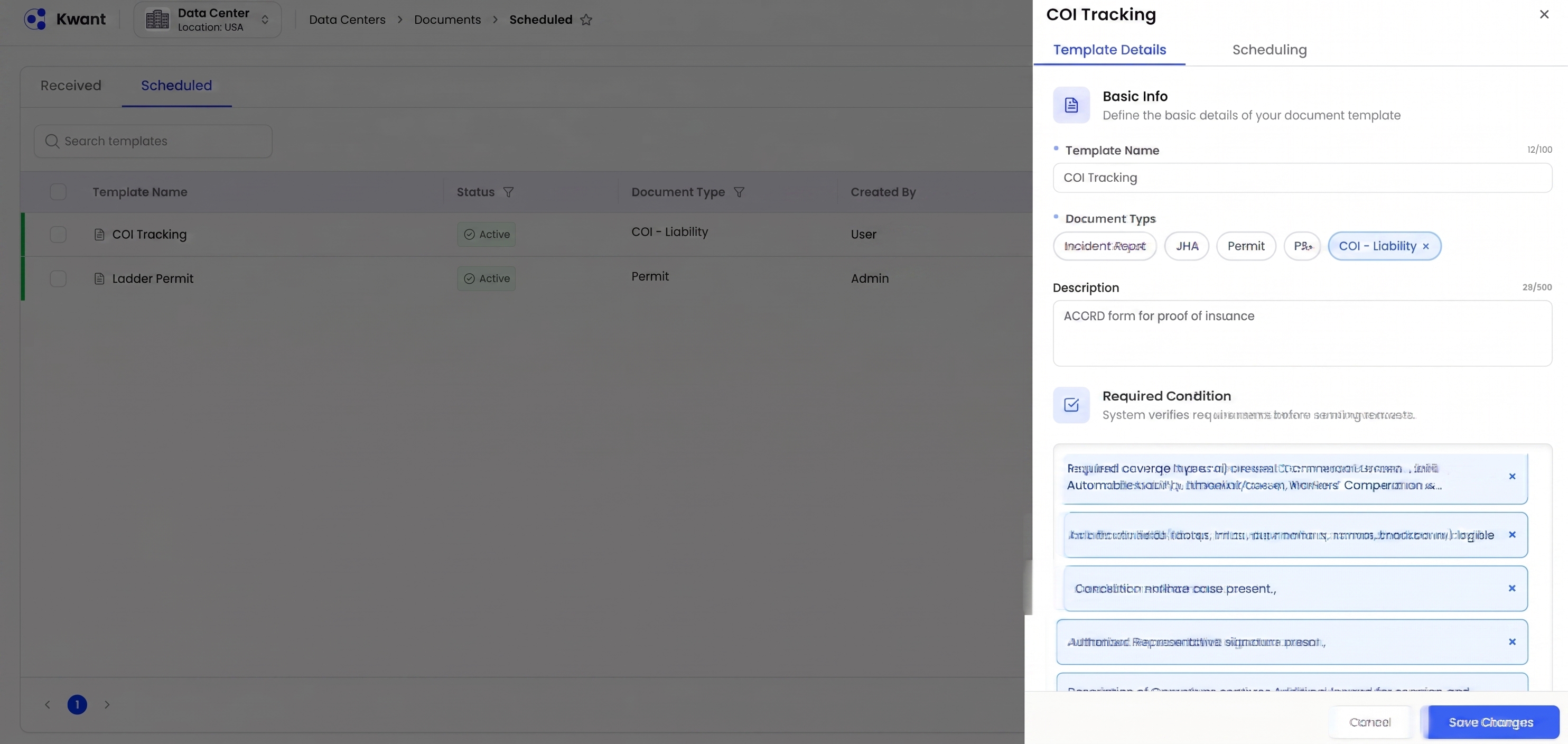
1. Set Up Templates
Safety teams can create templates for different forms based on their KPIs, SOPs, and safety requirements.
Teams can define the conditions they want FormIQ to check, helping standardize how documents are reviewed.
Supported use cases include:
- Job Hazard Analyses (JHAs)
- Pre-Task Plans (PTPs/PTAs)
- Daily Task Analyses (DTAs)
- Work permits
- Toolbox talks
- Incident reports
- Custom safety forms
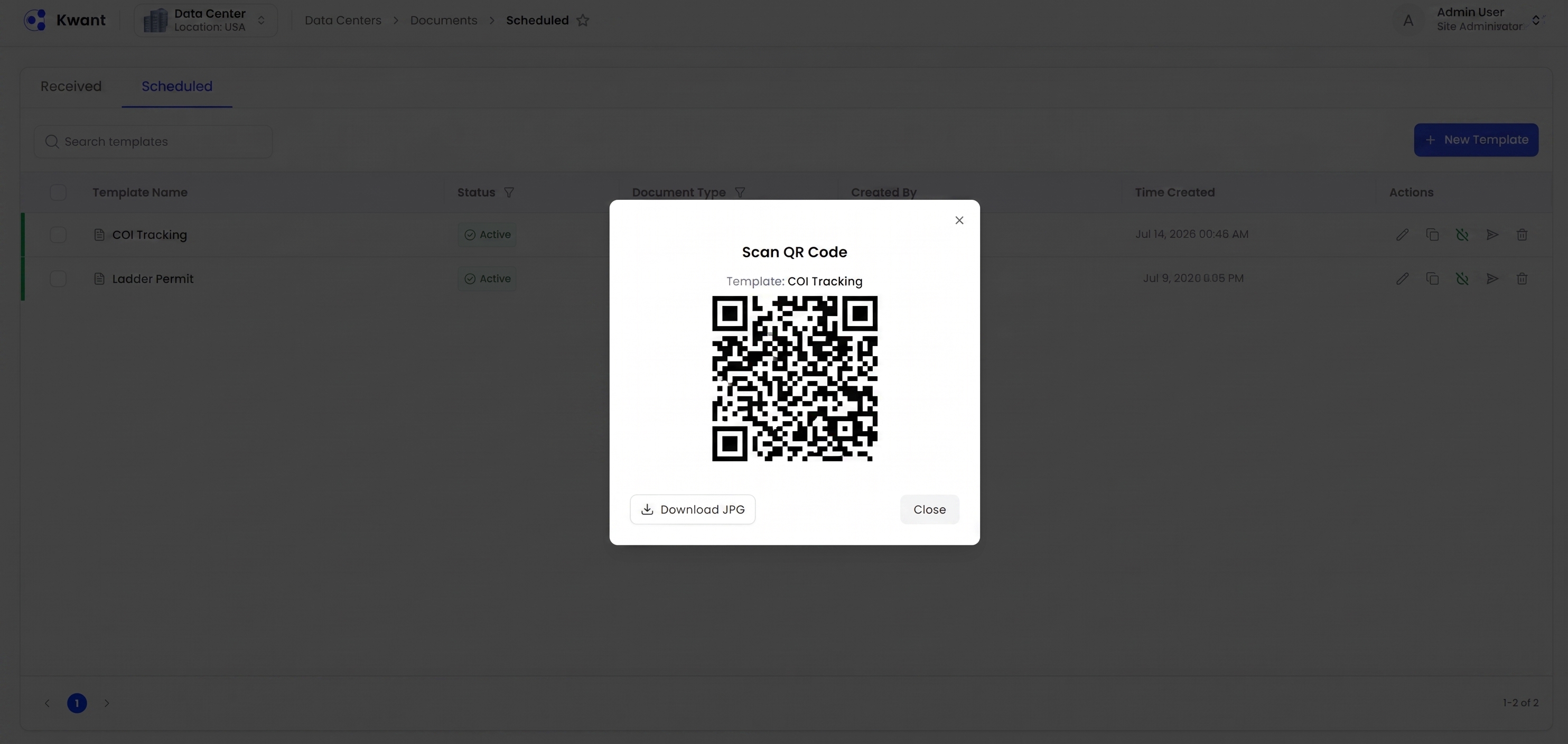
2. Submit
Workers and foremen can submit forms by taking a photo or uploading the document through a secure text or email link.
FormIQ supports handwritten and printed forms, as well as digital documents.
No new app or additional platform login is required for field submission.
3. Validate
This is where AI takes over much of the manual review process.
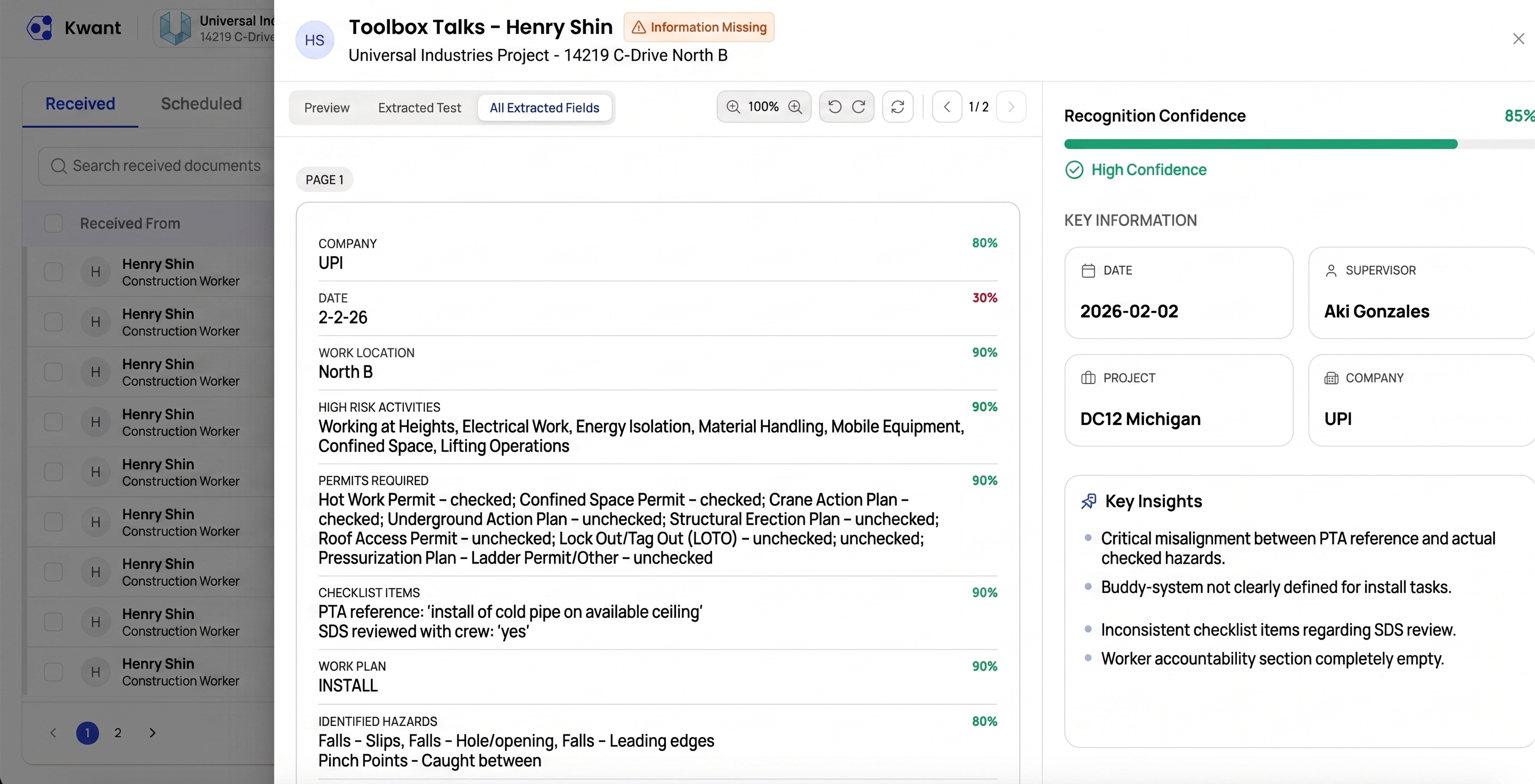
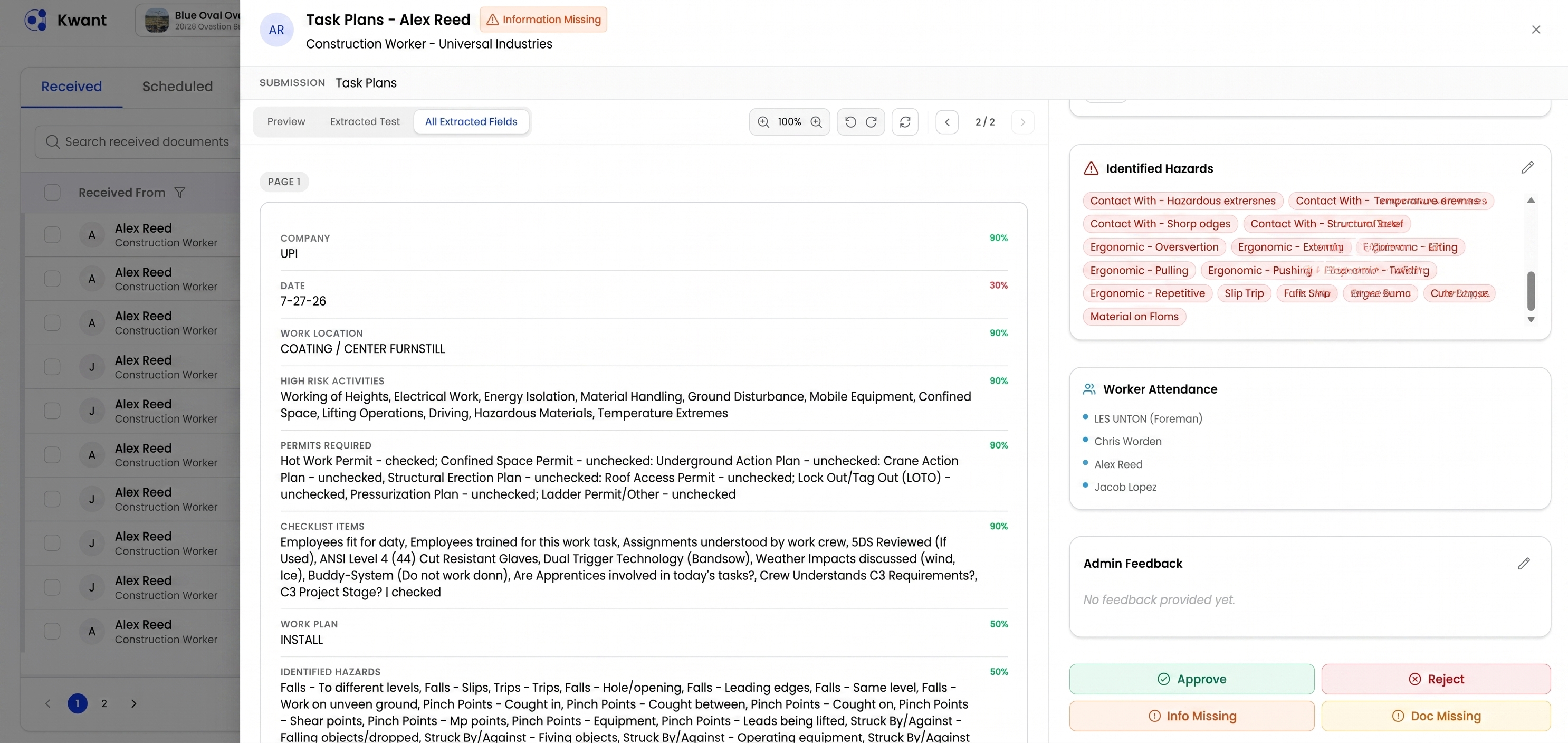
FormIQ extracts information from the submitted form and checks it against the safety requirements defined by the team.
For example, a safety team may require a JHA to:
- Reference a specific permit
- Identify applicable hazards
- Include appropriate control measures
- Specify required PPE
- Capture worker information
- Include required signatures
- Meet other project-specific requirements
FormIQ can identify missing or incomplete information and surface potential compliance gaps.
It can also provide a confidence score and highlight areas that require attention.
Instead of a safety professional manually reviewing every field on every document, the system helps prioritize the forms and issues that need human attention.
4. Approve
Once a form has been reviewed and the required information is present, supervisors can review records through a centralized dashboard.
Forms become searchable digital records instead of documents sitting in filing cabinets, inboxes, or scattered folders.
Catch Compliance Issues Before Work Starts
One of the biggest opportunities with FormIQ is moving safety review closer to the point where work begins.
Consider a foreman completing a Daily Task Analysis before a shift.
The form identifies a potential hazard, such as a trip or fall risk. The foreman has identified the hazard, but the required control measures haven't been documented.
Instead of discovering the problem hours later during a manual review, FormIQ can flag the missing information and identify the fields that need to be corrected.
The foreman can update the form and resubmit it.
This creates a faster feedback loop:
Complete → Submit → Instant AI Review & Feedback → Correct & Resubmit (if needed) → Approve
Rather than:
Complete → Submit → Wait → Manually Review → Discover Issue → Track Down Crew → Correct → Approve
That difference matters on large, fast-moving construction projects.
Bringing AI to Handwritten Construction Safety Forms
One of the most important aspects of FormIQ is its ability to work with handwritten forms.
Construction teams don't necessarily want to eliminate paper.
In many cases, handwritten forms are an intentional part of the safety process. Physically writing down hazards, checking applicable sections, discussing controls with the crew, and signing a document can help workers actively participate in the pre-task planning process.
FormIQ is designed to preserve that workflow while eliminating much of the administrative work that follows.
A worker can continue using the form they know.
The safety team gets structured data.
And AI handles much of the initial document processing and validation.
From Paperwork to Safety Intelligence
FormIQ isn't just about scanning documents.
The goal is to turn everyday safety forms into actionable, searchable safety data.
Once forms are processed, teams can gain visibility into submitted, missing, and flagged documents across projects, contractors, and crews.
That creates opportunities to move beyond simply storing safety paperwork.
Instead of asking:
"Where is that form?"
Teams can start asking:
- Which forms are missing?
- Which submissions have compliance issues?
- Which crews are consistently submitting incomplete forms?
- Are required permits being referenced?
- Are identified hazards accompanied by control measures?
- Are required signatures present?
- Which safety documents need attention right now?
FormIQ is designed to help safety teams answer those questions faster.
Built for Construction Field Workflows
Construction software often fails when it requires crews to completely change how they work.
FormIQ takes a different approach.
The module is designed around the workflows already happening in the field:
Workers complete forms → forms are submitted → AI processes them → safety requirements are checked → supervisors review the results.
The system supports multiple submission methods and form types while reducing the amount of manual administrative work required from safety teams.
According to the FormIQ product overview, workers can submit forms from any device without an app or platform login, while safety teams can manage review and approval through a centralized dashboard.
FormIQ + the Kwant Platform
FormIQ is part of the broader Kwant workforce management platform.
That creates the potential to connect safety documentation with other workforce information already available in Kwant, including worker count, attendance, and location data.
This helps bring different pieces of workforce and safety information together rather than keeping forms isolated from the rest of the jobsite data.
FormIQ is designed to help transform safety forms from static documents into structured information that can support reporting, audits, and safety analytics.
What's Next for FormIQ?
FormIQ is currently being tested with a select group of Kwant customers.
Their feedback is helping the team refine the product, improve validation workflows, and determine how FormIQ can best support the realities of large construction projects.
The goal is simple: make safety documentation easier to collect, faster to review, and more useful once it's submitted.
As FormIQ continues through beta testing, Kwant is working toward making the feature available to a broader group of customers.
The Future of Construction Safety Forms
Construction safety documentation isn't going away.
But the way teams manage that documentation can change.
With FormIQ, crews can continue using the handwritten and digital forms that fit their workflows while AI helps safety teams process, validate, and organize the information inside them.
For safety teams managing hundreds of forms across large projects, that's more than a paperwork improvement.
It's a step toward real-time, AI-powered safety compliance.
FormIQ is currently in beta with select Kwant customers. Contact Kwant to learn more about the upcoming release.
Frequently Asked Questions
What is FormIQ?
FormIQ is Kwant's AI-powered safety forms solution for construction. It uses AI to read, extract, validate, and organize information from handwritten, printed, and digital safety forms, helping teams identify missing information and potential compliance issues faster.
Can FormIQ process handwritten construction forms?
Yes. FormIQ is designed to recognize handwritten as well as printed forms. This allows construction teams to continue using familiar paper-based workflows while reducing the manual work required to review and organize those documents.
What types of construction safety forms does FormIQ support?
FormIQ can support a range of safety documentation, including Job Hazard Analyses (JHAs), Pre-Task Plans (PTPs/PTAs), Daily Task Analyses (DTAs), work permits, toolbox talks, incident reports, and custom safety forms.
How does AI validate a safety form?
FormIQ extracts information from submitted forms and checks it against safety requirements defined by the team. Depending on the form and configured requirements, this can include checking for missing fields, signatures, permits, PPE requirements, identified hazards, and corresponding control measures.
Can FormIQ identify missing information before work begins?
That's one of the key use cases for FormIQ. When a submitted form contains missing or incomplete information, the system can flag the issue so the form can be corrected and resubmitted before approval.
For example, if a JHA identifies a hazard but does not document the required control measures, FormIQ can help surface that gap for review.
Do workers need to download another app to use FormIQ?
No. FormIQ is designed to support field workflows without requiring workers to adopt another app or platform login. Forms can be submitted by taking a photo or uploading the document through a secure text or email link.
Does FormIQ replace safety professionals?
No. FormIQ is designed to assist safety teams, not replace them. AI can process documents, identify potential gaps, and prioritize issues, while supervisors and safety professionals remain responsible for reviewing and approving safety documentation.
How does FormIQ help safety teams save time?
Instead of manually collecting, filing, and reviewing every form, FormIQ automates much of the initial document processing and validation. This helps safety teams spend less time searching through paperwork and more time addressing the issues that require their attention.
Is FormIQ available to all Kwant customers?
FormIQ is currently in beta and is being tested with a select group of Kwant customers. The product is continuing to evolve based on customer feedback as Kwant works toward a broader release.
How can I learn more about FormIQ?
If you're managing large volumes of construction safety documentation and want to see how AI could simplify your workflow, request a FormIQ demo with the Kwant team.


%20(1).svg)


